
iPhone 18 Pro Max – VDD_MAIN Power Distribution Explained
Category: iPhone Schematic Analysis | Power Management | Motherboard Troubleshooting
Introduction
Understanding power distribution is one of the most important aspects of advanced smartphone motherboard troubleshooting. Before diagnosing a power-related fault, technicians should understand how the main power networks are distributed across the motherboard.
In this article, we will explore the iPhone 18 Pro Max VDD_MAIN Power Distribution, including VDD_MAIN, VDD_MAIN_NORTH, VDD_MAIN_SOUTH, VDD_MAIN_EAST and VDD_BOOST.
This technical reference identifies the major ICs and circuit sections associated with these power networks, helping technicians understand the motherboard’s power distribution architecture.
iPhone 18 Pro Max – VDD_MAIN Distribution Diagram
The following schematic distribution diagram provides a visual overview of the different power networks and their associated components.
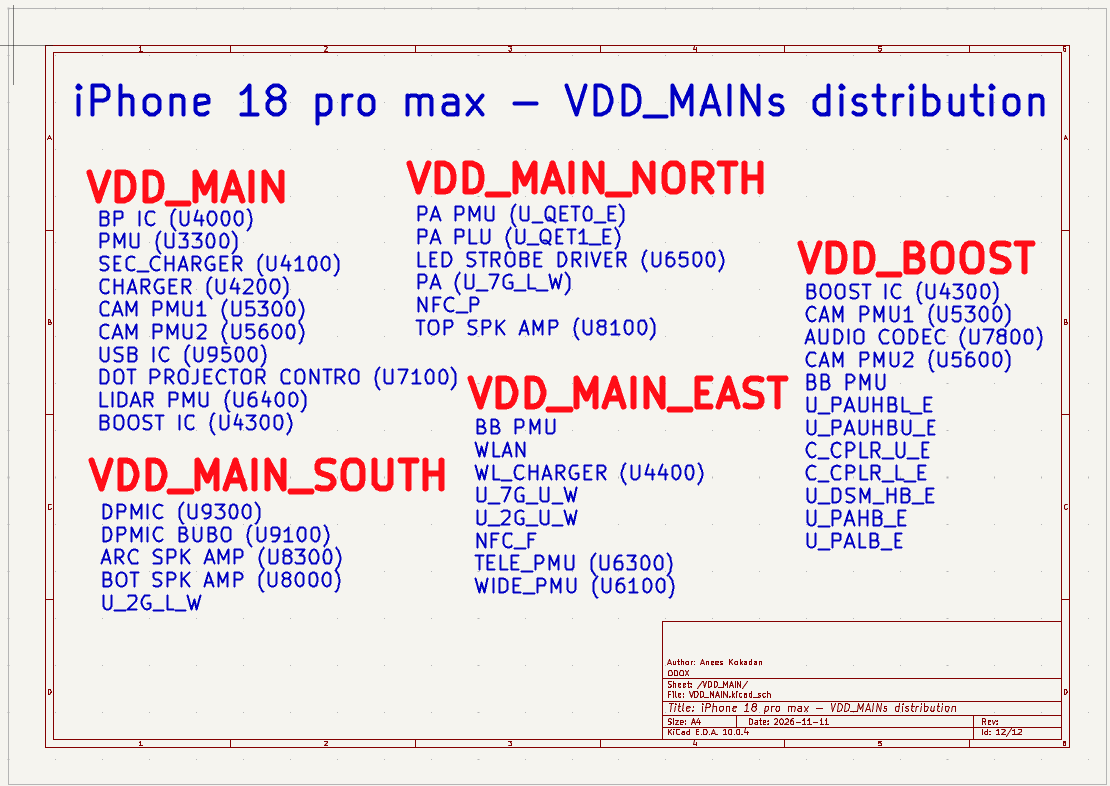
Designed by Anees Kokadan | ODOX Institute of Technology
1. VDD_MAIN Power Distribution
VDD_MAIN is a major power network in the iPhone 18 Pro Max motherboard. According to the distribution diagram, this network is associated with several power management, charging, camera and peripheral circuit sections.
VDD_MAIN – Connected Components
- BP IC (U4000)
- PMU (U3300)
- SEC_CHARGER (U4100)
- CHARGER (U4200)
- CAM PMU1 (U5300)
- CAM PMU2 (U5600)
- USB IC (U9500)
- DOT PROJECTOR CONTROL (U7100)
- LIDAR PMU (U6400)
- BOOST IC (U4300)
2. VDD_MAIN_NORTH Distribution
VDD_MAIN_NORTH is another power distribution section identified in the iPhone 18 Pro Max diagram. The following components and connections are listed under this network.
VDD_MAIN_NORTH – Connected Components
- PA PMU (U_QET0_E)
- PA PLU (U_QET1_E)
- LED STROBE DRIVER (U6500)
- PA (U_7G_L_W)
- NFC_P
- TOP SPK AMP (U8100)
3. VDD_MAIN_SOUTH Distribution
The VDD_MAIN_SOUTH network includes several power management and audio-related components. The distribution diagram identifies the following connections.
VDD_MAIN_SOUTH – Connected Components
- DPMIC (U9300)
- DPMIC BUB0 (U9100)
- ARC SPK AMP (U8300)
- BOT SPK AMP (U8000)
- U_2G_L_W
4. VDD_MAIN_EAST Distribution
The VDD_MAIN_EAST distribution section includes baseband, wireless, charging, NFC and camera-related power management connections.
VDD_MAIN_EAST – Connected Components
- BB PMU
- WLAN
- WL_CHARGER (U4400)
- U_7G_U_W
- U_2G_U_W
- NFC_F
- TELE_PMU (U6300)
- WIDE_PMU (U6100)
5. VDD_BOOST Distribution
The VDD_BOOST section of the distribution diagram identifies the BOOST IC, camera PMUs, audio codec and several additional circuit connections.
VDD_BOOST – Connected Components
- BOOST IC (U4300)
- CAM PMU1 (U5300)
- AUDIO CODEC (U7800)
- CAM PMU2 (U5600)
- BB PMU
- U_PAUHBL_E
- U_PAUHBU_E
- C_CPLR_U_E
- C_CPLR_L_E
- U_DSM_HB_E
- U_PAHB_E
- U_PALB_E
6. Importance of Power Distribution in Troubleshooting
Understanding power distribution is essential when performing motherboard-level troubleshooting. A proper understanding of the power networks helps technicians identify the circuit sections associated with a particular power line.
Power distribution analysis is useful for:
- Identifying ICs associated with a particular power network.
- Understanding motherboard power architecture.
- Investigating short circuits on power rails.
- Tracing power connections through the schematic.
- Identifying relevant circuit sections during troubleshooting.
- Improving fault isolation and diagnostic efficiency.
7. How to Use This Diagram During Troubleshooting
When troubleshooting a power-related issue, technicians can use the distribution diagram as an initial reference. A systematic approach is recommended.
- Identify the affected power rail: Determine which power network is involved in the fault.
- Refer to the distribution diagram: Identify the components associated with that network.
- Perform measurements: Use a multimeter to check resistance, continuity or diode-mode readings as appropriate.
- Refer to the detailed schematic: Follow the actual electrical connections and component branches.
- Isolate the faulty section: Use appropriate diagnostic techniques to narrow down the suspected faulty component or circuit.
- Verify the repair: Recheck the affected power network and confirm normal device operation.
This diagram represents the distribution of power networks and their associated components. It does not provide individual voltage values, power-up sequences or detailed branch connections. For actual electrical tracing and measurements, always refer to the complete motherboard schematic.
Download the Original VDD_MAIN Schematic PDF
Want to study the complete iPhone 18 Pro Max VDD_MAIN power distribution diagram? Download the original high-resolution PDF for technical reference and learning.
⇩ Download VDD_MAIN Distribution PDF
Document:
iPhone 18 Pro Max – VDD_MAIN Distribution
Author:
Anees Kokadan
Organization:
ODOX Institute of Technology
Format: PDF
8. Final Thoughts
Understanding VDD_MAIN power distribution is an important skill for technicians involved in advanced iPhone motherboard troubleshooting.
Rather than randomly checking components, technicians should develop the habit of studying power distribution diagrams, identifying associated ICs and following the schematic systematically.
A good understanding of power distribution and schematic analysis can significantly improve troubleshooting skills and diagnostic efficiency.
At ODOX Institute of Technology, schematic analysis and practical circuit tracing are important parts of advanced smartphone technology training.