
📱 Understanding Firmware File Types and How to Extract OPPO/Realme .ofp Files
When it comes to smartphone servicing and flashing, different brands use different firmware file formats. Knowing these file types — and how to work with them — is crucial for any mobile technician or repair engineer.
In this article, we’ll break down the most common firmware formats used by major smartphone brands and explain how to handle the OPPO/Realme .OFP format efficiently.
Common Smartphone Firmware File Extensions
Each smartphone brand uses its own file structure and flashing method. Below is a list of popular firmware extensions and what they represent:
Brand Firmware Extension Description
Samsung (Partition Info) .pit Partition Information Table file; defines partition layout for Samsung devices.
Samsung .tar.md5 Used with Odin for flashing firmware on Samsung devices.
Apple (iPhone/iPad) .ipsw iOS firmware package used for restoring iPhones/iPads via iTunes or Finder. OPPO .ofp Official firmware package used by OPPO’s flashing tools.
OnePlus (new models) .ofp Used in newer OnePlus firmware packages.
OnePlus (older models) .ops Older firmware format for OnePlus devices.
Qualcomm-based devices .xml XML-based firmware file used with QFIL (Qualcomm Flash Image Loader). MediaTek-based devices scatter.txt Scatter file defines partition layout for SP Flash Tool. Unisoc/Spreadtrum .pac Firmware package used with ResearchDownload/UpgradeDownload tools. Huawei .app Official firmware package for Huawei/Honor devices.
Sony .ftf Flash Tool Firmware used by Sony Flash Tool.
LG .tot / .kdz Firmware packages used by LG Flash Tool.
Realme .ofp Same structure as OPPO firmware, compatible with Realme Flash Tool.
Working with OPPO / Realme .OFP Files
The .OFP firmware files are encrypted and packed by OPPO/Realme to be used with their official service tools. These tools usually require authorized accounts or paid access, which can limit independent technicians.
However, if you want to flash or analyze .OFP files without using paid tools, you can convert or extract them into SoC-based firmware formats like:
- Scatter files for MediaTek (MTK) devices
- XML files for Qualcomm devices
This allows you to flash the firmware using tools such as SP Flash Tool (MTK) or QFIL (Qualcomm).
🔧 How to Convert .OFP Files
There are several methods and tools available for extracting .OFP firmware:
1. Using EasyJTAG Box
A professional hardware tool that supports extracting .OFP files and converting them to usable firmware formats.
2. Using UMT/QcFire Tool
Load the .OFP firmware in UMT QcFire; it automatically detects and converts it to a Qualcomm-compatible XML format.
3. Using CM2 Dongle (Infinity Box)
When you load an .OFP file in CM2, it automatically extracts it into a scatter file for MTK devices.
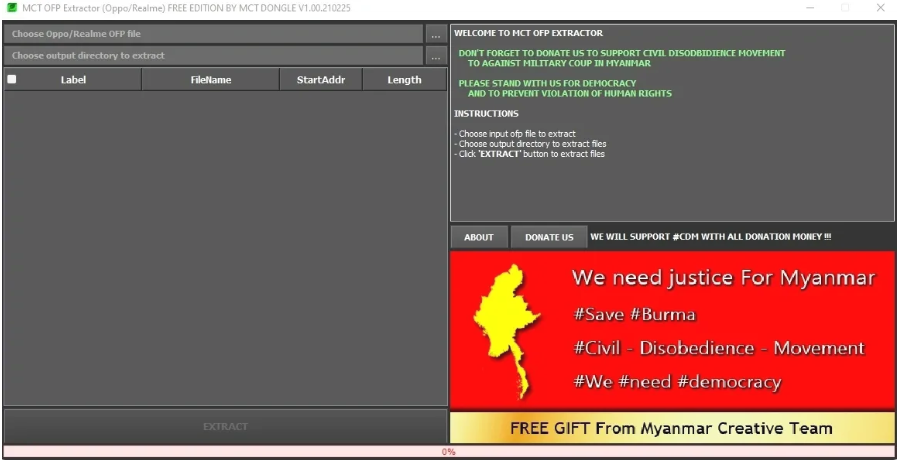
4. Using Free Tool – MCT OFP Extractor
If you don’t have access to paid dongles or boxes, you can use MCT OFP Extractor, a free and easy-to-use Windows tool that extracts .OFP files into standard firmware files.
⚙️ Download MCT OFP Extractor
You can download the MCT OFP Extractor Tool (v1.00.210225) from the links below:
🧩 Final Thoughts
Understanding firmware file types is essential for safe and efficient mobile servicing. While official tools may require paid authorization, extracting .OFP files using MCT Extractor or professional dongles provides a practical alternative for technicians working with OPPO, Realme, or OnePlus devices.
Always ensure you use firmware that matches your device’s exact model and region to avoid bricking or compatibility issues.
✅ Tip:
Keep your toolset updated — many brands frequently update their firmware encryption and packaging formats.
Download MCT OFP extractor from the below links:
https://www.mediafire.com/file/b6tefm1d0mocqmz/MCT+OFP+Extractor+Tool+V1.00.210225.zip/file
https://drive.google.com/file/d/18wtgv1CppVsAJAf6NzmQa0f3uM6h0MMc/view?usp=sharing